
Agora
ἀγορά · Greek — the marketplace
A CRM with a shared inbox attached and a model in the authoring seat: the conversation that won the deal sits on the deal, and the automation around it is something you describe in a sentence rather than assemble from condition boxes.
What it includes
The shared inbox
- WhatsApp and Instagram threads, live, in the same place as the deal
- Assign a thread, snooze it, close it — and a new message reopens it, because the customer does not know you filed it away
- Fifteen kinds of incoming message, each named: a location, a contact card, a cart, a sticker, a reaction, a voice note
- A message kind we have never seen is recorded as exactly that, never quietly as text
Templates
- Write a WhatsApp template here and submit it to Meta for approval without leaving the app
- Header, body, footer and buttons, with the variable slots labelled instead of numbered
- Approval status is Meta’s verdict, mirrored — never ours to set
- Form templates: teach it to read your web form’s notification mail once, by highlighting a real sample
- A form lead then arrives with the name, phone and e-mail already pulled out
Automation
- Playbooks: an ordered set of rules where the first one that fits wins, so “otherwise” is finally sayable
- One switch pauses a whole campaign, and its send budget is pooled rather than multiplied
- Eleven triggers — deals, messages, quotes and paid invoices — fourteen actions, and a bounded wait that branches on whether they replied
- Opt-outs, consent, send caps and a business-hours window
- Statistics that count what did not happen, and why
Sensitive data
- Clients’ health data in its own store, never in a CRM field
- Encrypted per value, visible only to the roles you choose
- Signed consent, in person on a tablet or remotely from a link
- Every read logged; erased on withdrawal and after the retention you set
Channels and mailboxes
- WhatsApp Business and Instagram through the Meta APIs
- Gmail and Outlook by OAuth, and any other mailbox over IMAP with a username and password
- Google Sheets and Excel Online tabs, polled and ingested
- A per-company BCC address, so a rep can file a thread with no connector at all
- Mail and calendar land on the timeline beside the messages
Funnel and activities
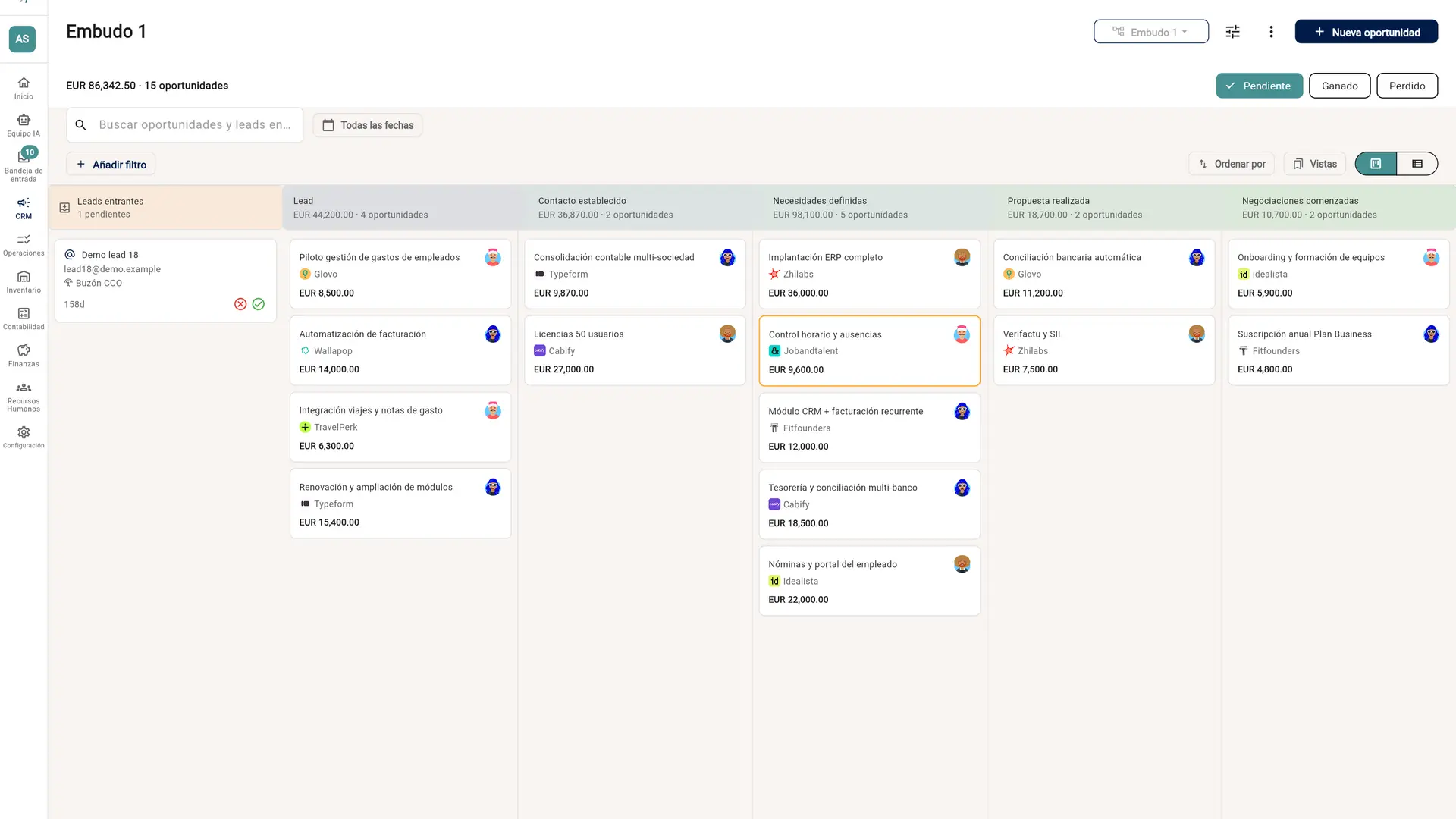
- Pipeline with the stages you define, public or private
- Custom fields with typed filtering and sorting
- Activities, tasks and a shared calendar
- Saved views, and server-side search, sort and paging across every list
Lead capture
- Eight inbound channels feed one triage queue, each badged with where it came from
- A stranger’s WhatsApp opens a thread immediately but does not mint a contact until a human accepts it
- Web forms that declare whether they create a person or a company
- Spreadsheet and file import, with the same de-duplication either way
Mini-apps
- Describe a screen and Claude writes it: a customer card, a visit report, a planner
- As its own screen, or inside a contact or an opportunity
- Runs with the permissions of whoever is looking at it, in a frame that cannot reach the outside
- Fields it needs are created in the CRM on publish, and stay there if the page goes
The shared inbox
- WhatsApp and Instagram threads, live, in the same place as the deal
- Assign a thread, snooze it, close it — and a new message reopens it, because the customer does not know you filed it away
- Fifteen kinds of incoming message, each named: a location, a contact card, a cart, a sticker, a reaction, a voice note
- A message kind we have never seen is recorded as exactly that, never quietly as text
Funnel and activities
- Pipeline with the stages you define, public or private
- Custom fields with typed filtering and sorting
- Activities, tasks and a shared calendar
- Saved views, and server-side search, sort and paging across every list
Mini-apps
- Describe a screen and Claude writes it: a customer card, a visit report, a planner
- As its own screen, or inside a contact or an opportunity
- Runs with the permissions of whoever is looking at it, in a frame that cannot reach the outside
- Fields it needs are created in the CRM on publish, and stay there if the page goes
Channels and mailboxes
- WhatsApp Business and Instagram through the Meta APIs
- Gmail and Outlook by OAuth, and any other mailbox over IMAP with a username and password
- Google Sheets and Excel Online tabs, polled and ingested
- A per-company BCC address, so a rep can file a thread with no connector at all
- Mail and calendar land on the timeline beside the messages
Lead capture
- Eight inbound channels feed one triage queue, each badged with where it came from
- A stranger’s WhatsApp opens a thread immediately but does not mint a contact until a human accepts it
- Web forms that declare whether they create a person or a company
- Spreadsheet and file import, with the same de-duplication either way
Sensitive data
- Clients’ health data in its own store, never in a CRM field
- Encrypted per value, visible only to the roles you choose
- Signed consent, in person on a tablet or remotely from a link
- Every read logged; erased on withdrawal and after the retention you set
Templates
- Write a WhatsApp template here and submit it to Meta for approval without leaving the app
- Header, body, footer and buttons, with the variable slots labelled instead of numbered
- Approval status is Meta’s verdict, mirrored — never ours to set
- Form templates: teach it to read your web form’s notification mail once, by highlighting a real sample
- A form lead then arrives with the name, phone and e-mail already pulled out
Automation
- Playbooks: an ordered set of rules where the first one that fits wins, so “otherwise” is finally sayable
- One switch pauses a whole campaign, and its send budget is pooled rather than multiplied
- Eleven triggers — deals, messages, quotes and paid invoices — fourteen actions, and a bounded wait that branches on whether they replied
- Opt-outs, consent, send caps and a business-hours window
- Statistics that count what did not happen, and why
AI in the authoring seat
Describe the automation. Read what it wrote. Then decide.
“When a lead asks about pricing send the rate card and tell Ana; if they don’t answer in 48 hours, follow up once.” That sentence goes in, and a set of rules comes out — real stages, real templates, real people, by their real ids. The model runs once, at the moment you asked, and what it produces is data you review in the ordinary editor. Nothing it wrote is executed as instructions, and nothing reaches the engine until you press save.
What an automation can do
Send an approved template
The only kind of message that may reach a WhatsApp thread that has gone quiet.
Start a conversation
An approved template to a customer who never wrote — a deal entered by hand or by your own systems. Consent, opt-outs and a monthly cap on first contacts still apply.
Send a message
Free-form, inside the reply window the customer’s own message opened.
Ask a question with buttons
Up to three replies to tap, so the answer comes back as something you can act on.
Draft a reply for a human
The assistant writes it and leaves it in the thread. It is never sent — the rep reads it, edits it and sends it themselves.
Wait for a reply
Park for a set number of hours and take one branch if they answer, another if they do not.
Assign it to someone
A named person, or whoever currently has the fewest open threads.
Notify a colleague
An internal message. Costs nothing, reaches nobody outside.
Create an activity
A call, a meeting, a task — on the calendar, attached to the deal.
Move the deal
Advance it to a stage, through a path that cannot make the rule re-fire itself.
Set a field
This is also how tagging works: a list field is a label, a yes/no field is a flag.
Close, snooze or reopen
Inbox housekeeping, so a rule can tidy up after itself.
Call your own webhook
A signed JSON envelope to a URL you own — the way out to anything we have not built.
The model writes rules. It never runs them.
What fires at three in the morning is a static rule evaluated by the same engine that runs the ones you wrote by hand. There is no model in the runtime, so an automation cannot be talked into doing something new by a customer’s message.
A proposal that cannot run is refused before you see it
Every proposed action is parsed into the exact type the engine executes, every id has to exist and belong to your company, and every condition has to be one the engine can actually answer. A rule that reads a field nobody has would match nothing forever — that is a silent disappointment, so it is rejected rather than shown.
It cannot write something that spends without a limit
Anything that can send a billable message has to carry a cap. That is enforced on the proposal, not requested in the prompt, so the planner is structurally incapable of handing you an uncapped spender.
Try the condition against real conversations first
Before saving, see which of your actual threads the rule would have matched. No model is involved in that answer — it is the engine’s own evaluator over the engine’s own view of a conversation, which is why the preview and the live behaviour cannot disagree.
And read any rule back in plain language
The same grammar, backwards: point at a rule somebody left behind two years ago and get a sentence describing what it does. Inheriting an automation nobody can explain is how campaigns end up switched off wholesale.
Its budget is separate on purpose
The CRM’s AI spend is metered in its own pool, never the assistant’s. An unattended surface must not be able to exhaust the budget the people chatting with L.U.C.A. are paying for — and a rule merely firing costs nothing at all.

Who watches it
Sales
Untriaged leads, stalled deals and conversations nobody answered.
One of the eleven AI employees is assigned to this domain. It reads what a person in that role could read, and files what it finds.